Incoming Orders
Incoming Orders is the first stop for new orders entering the dispensing workflow. Orders appear here regardless of how they originate — whether received electronically through SureScripts, submitted via the Prescriber Portal, sent by e-fax, transferred from another pharmacy, or entered manually for walk-ins and verbal orders. This queue is where you review new orders, confirm details are complete, and move them forward for processing.
Page layout
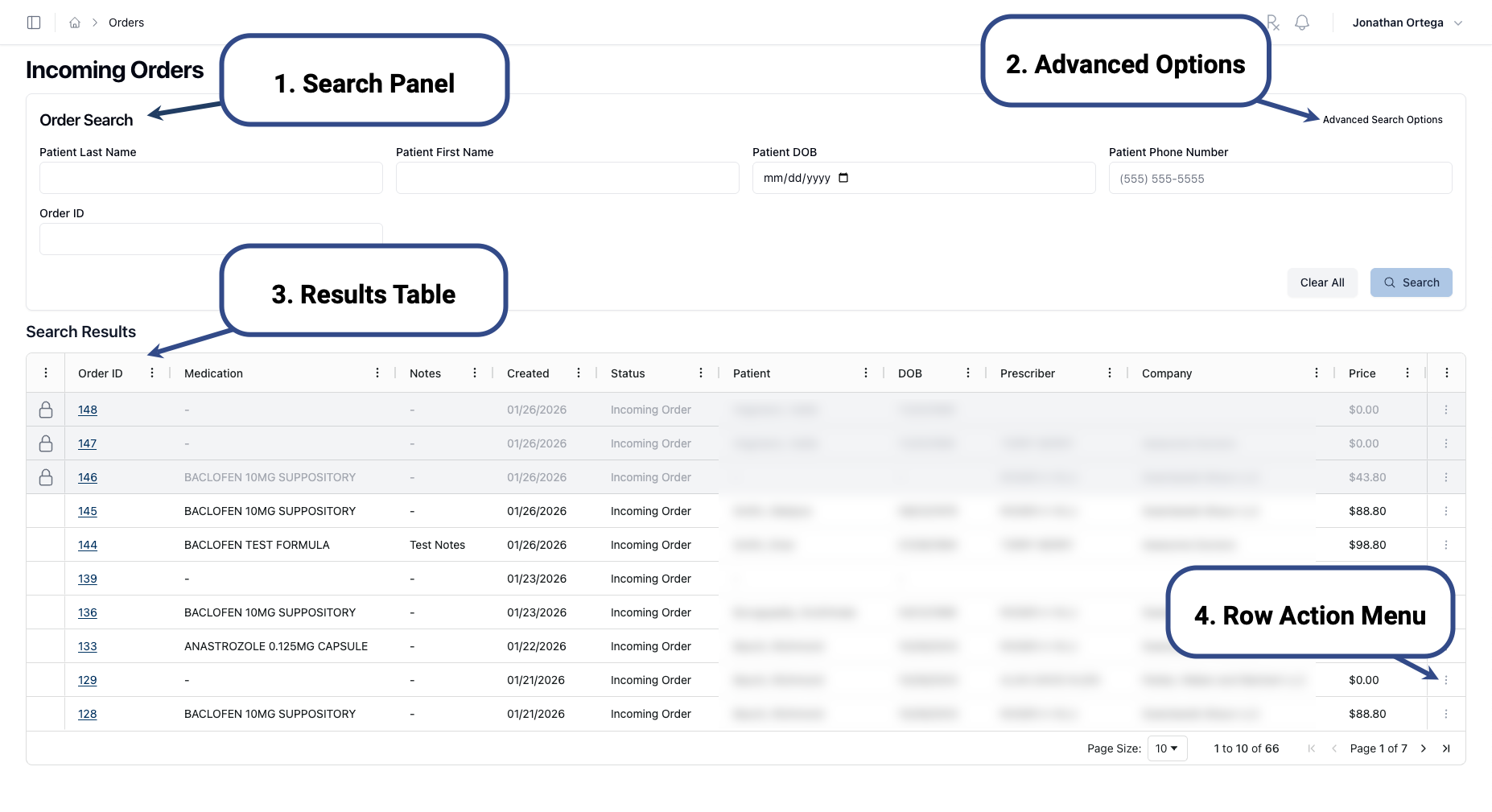
1. Search Panel — Find orders by patient name, DOB, phone, or Order ID.
2. Advanced Options — Additional filters for medication, prescriber, and date ranges.
3. Results Table — Orders in this queue with key details at a glance. Click an Order ID to open the full order.
4. Row Action Menu — Actions for individual orders, such as editing or deleting the order.
Common next actions
From this page, you'll typically:
Search for an order — Find a specific order by patient or Order ID.
How-to: Searching incoming orders
Open an order — Click an Order ID to view the full order details.
How-to: Viewing an incoming order
Complete intake requirements — Fulfill all requirements so the order can advance to PV1.
How-to: Completing intake requirements