Patient Notes
You can view notes related to the patient record via the Patient Notes tab. This guide provides an overview of the information and actions available.
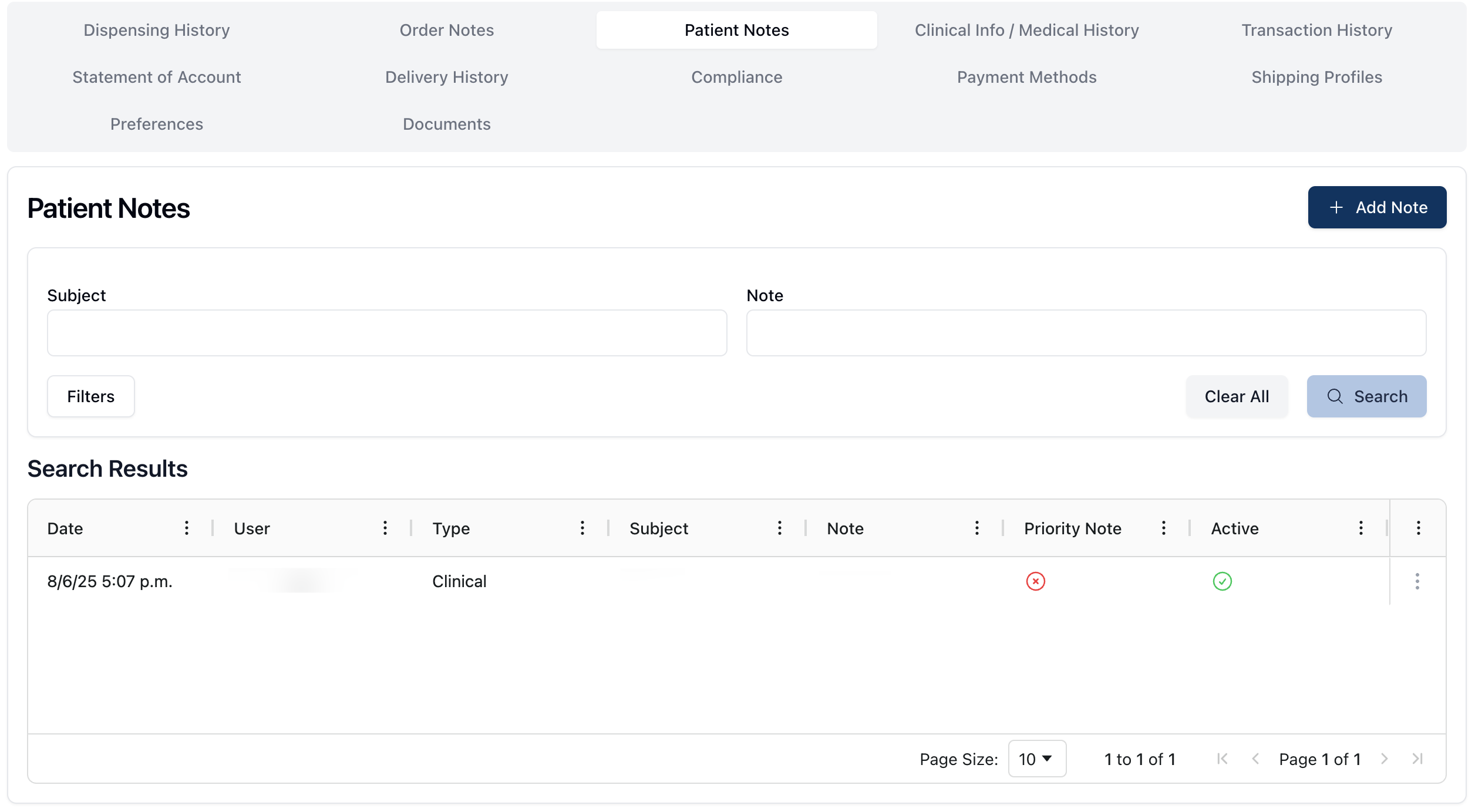 The Patient Notes tab includes a searchable history of notes added to the patient's record.
You can search for patient notes by subject or content using the search form at the top of the page. The Filters button filters the notes in the Search Results table, with the following options:
Show deactivated notes, which includes deactivated notes in the search results
Priority Notes, which filters the search results to only display notes marked as a Priority Note
When viewing the Search Results table, each result includes:
Date | The date and time the note was added. |
User | The first and last name of the user that added the note. |
Type | The note type, either Clinical or General. |
Subject | The note's subject. |
Note | The content of the note. |
Priority Note | Whether or not the note is a priority note. Priority notes display yes in this column; otherwise, the column displays no. |
Active | Whether or not the note is active. Active notes display yes in the column; inactive notes display no. |
To the right of each note, the actions menu ( ⠇) offers the option to:
View Note, which opens the note and related information in a sidebar overlay
Edit, which opens the Update Patient Note form
Deactivate, which allows you to deactivate the patient note